
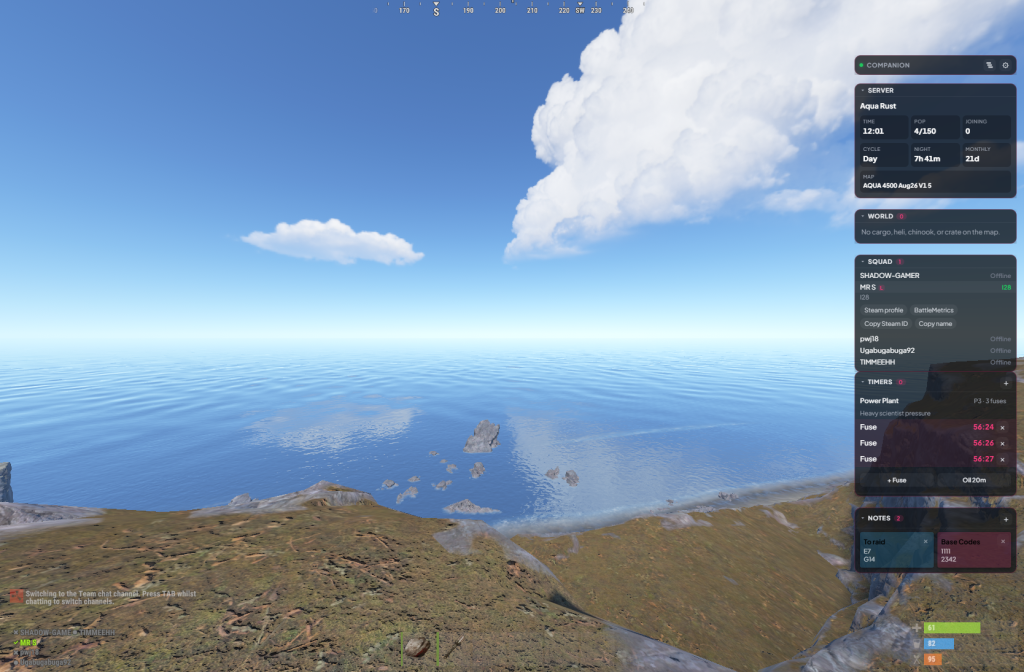
Playing Rust with a squad is half the game. The other half is keeping everyone on the same page — who is on oil, when Launch is up, whether cargo is still on the map, and what time it actually is on the server. Voice chat helps until it doesn’t. Discord pins go stale. Someone always has a different timer.
That’s exactly why I built Rust Companion — a Windows overlay that sits over the game and gives the squad a shared HUD. Monument timers, live server time and pop, world events on a grid, squad status, notes, and Rust+ chat commands. Cloud sync so the team sees the same thing.
Video
The Problem
If you’ve run a group wipe, you already know the pattern. One person is watching the map. Another is guessing the oil timer from memory. A third has a note in Discord that is twenty minutes out of date. You lose a crate because nobody agreed who was holding it. You miss cargo because the person who “had it” alt-tabbed.
I wanted the useful bits in the game, not in another tab. A HUD the whole squad can see, that follows Rust rather than fighting it, and that stays in sync without someone being the designated spreadsheet.
What It Does
Rust Companion is a Windows overlay for Rust squads. Whilst you play, it can show:
- Shared monument timers — Dome, Launch, a crate, or a custom countdown. Start it once; every overlay ticks the same time.
- Live server time and pop — so you are not asking in chat what the clock is.
- World events on a grid — heli, cargo, and the rest, with a grid reference rather than “it’s over there”.
- Squad status — who is on, at a glance.
- Notes — stickies the team can see. Codes, bunker spots, who is on oil.
- Rust+ chat commands — tap in the overlay, or fire the matching command in-game.
- Cloud sync — the team sees the same overlay, even if someone alt-tabs.
It Follows Rust
The overlay is meant to get out of the way until you actually need it.
- It shows when Rust is running.
- F8 toggles the HUD on and off.
- It waits until you have actually joined a server before attaching the team HUD. No overlay hanging over the menu for no reason.
- If you do not have a team for that server yet, it prompts you to create or join one.
That last point matters more than it sounds. A wipe on a new server is a different squad context. Companion treats it that way instead of dumping yesterday’s notes onto today’s map.
A HUD You Can Move
The overlay is a set of sections, not one giant panel. You can leave open what you use and collapse the rest:
- Server — time, pop, the usual live server bits.
- World — heli, cargo, chinook, crate, that sort of thing, on a grid.
- Squad — who is online.
- Timers — monument presets, event timers, or any duration you set.
- Notes — the stickies.
Sections are movable. Lock the layout when it is where you want it; unlock it when you need to shuffle things around a fight or a new monitor setup. Collapse anything you are not using so the HUD stays small.
Teams on the Web
The desktop overlay is the bit you look at in-game. The rest lives on the web dashboard at rust.simontodd.me — teams, subscriptions, and billing. Sign in with Steam in the app, pair Rust+ when you want live data, and manage the squad from the site.
Getting Started
It is a Windows app. The short version:
- Download it from rust.simontodd.me.
- Sign in with Steam.
- Join a Rust server. Create or join a team if you do not have one for that server yet.
- Pair Rust+ if you want live events and chat commands.
- Hit F8 if you need to hide or show the HUD.
Windows 10 and 11. That is it. No Discord bot to babysit, no spreadsheet to keep honest.
Why Build It
Same reason I build most of my own tools. The existing options were either a pile of Discord pins, a note someone forgot to update, or a third-party overlay that wanted to be a full second game. I wanted something that does one job: keep a Rust squad aligned whilst they are actually in the client.
So I built it.
Try It
If you play Rust with a group and you are tired of arguing about timers, grab it from rust.simontodd.me. I’ll add a proper walkthrough video to this post shortly.
Questions, or something you want on the HUD that is not there yet — get in touch.