
One of my clients runs a fishing tackle e-commerce site with around 10,000 products. They use Sortly for warehouse inventory management — barcode scanning, mobile stocktakes, the works. Great system for physical stock handling. The challenge was getting that data into PrestaShop automatically.
Sortly doesn’t have a native PrestaShop integration, and the generic inventory sync solutions out there didn’t quite fit the bill. So I built a module.
The Challenge
The site has a lot of combination products — rod lengths, reel sizes, line weights. Thousands of individual SKUs that need accurate stock levels. Manually updating quantities after every stocktake wasn’t practical, and there’s always a risk of human error when you’re copying numbers between systems.
The goal was simple: when stock changes in Sortly, PrestaShop should update automatically. No manual intervention, no delays.
What I Built
It’s a full PrestaShop 8 module. Install it, add your Sortly API key, configure which folders to sync, and it handles the rest.
The clever bit is the hybrid sync strategy. Rather than constantly hitting the API, it uses two approaches:
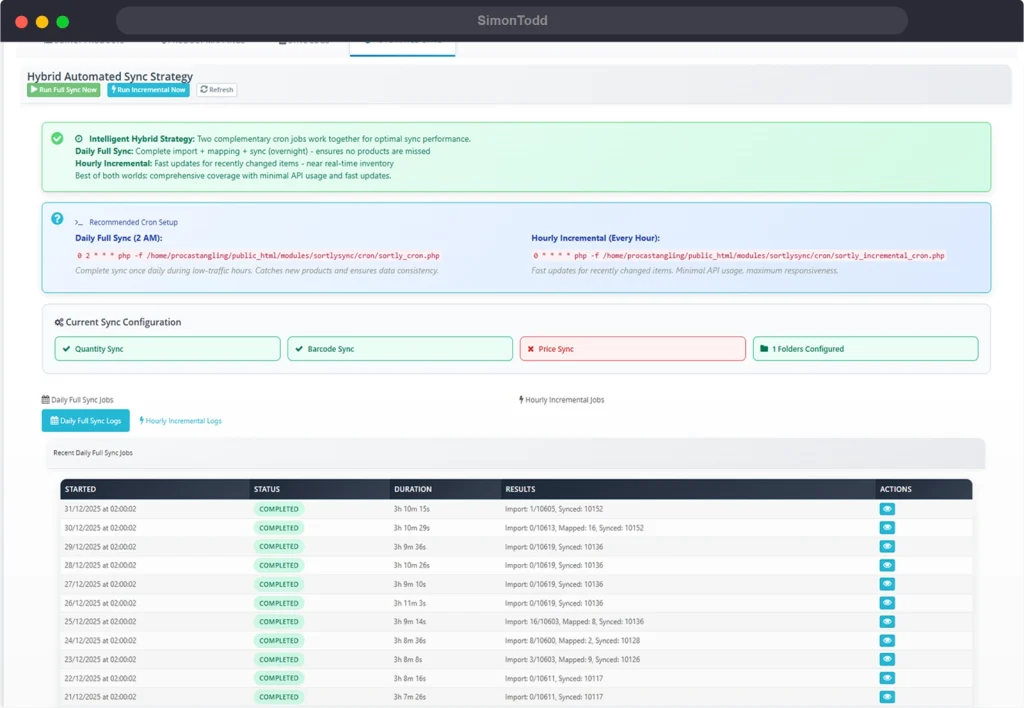
Daily Full Import: Runs overnight and pulls everything from your configured Sortly folders. This catches any new products that have been added to the warehouse.
Hourly Incremental Sync: Only fetches items that have changed since the last sync. Much faster, uses far fewer API calls, and keeps stock levels current throughout the day.
How It Works
Products are matched by barcode/EAN. When Sortly reports a quantity change, the module finds the corresponding PrestaShop product (or combination) and updates the stock level.
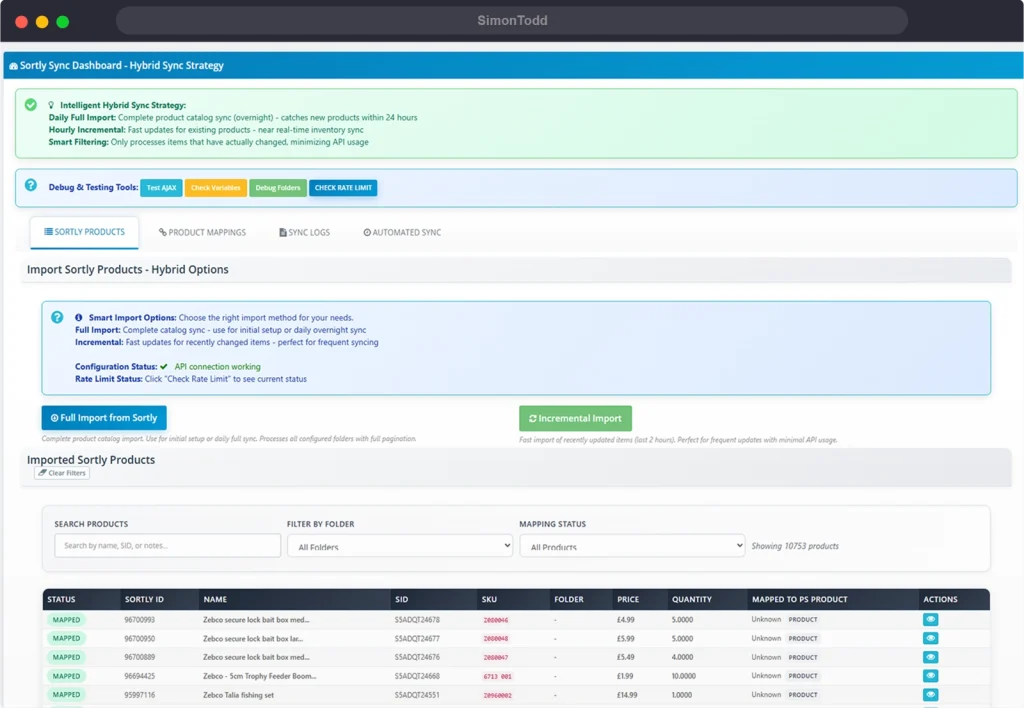
The dashboard shows you everything:
- All imported Sortly products with search and filtering
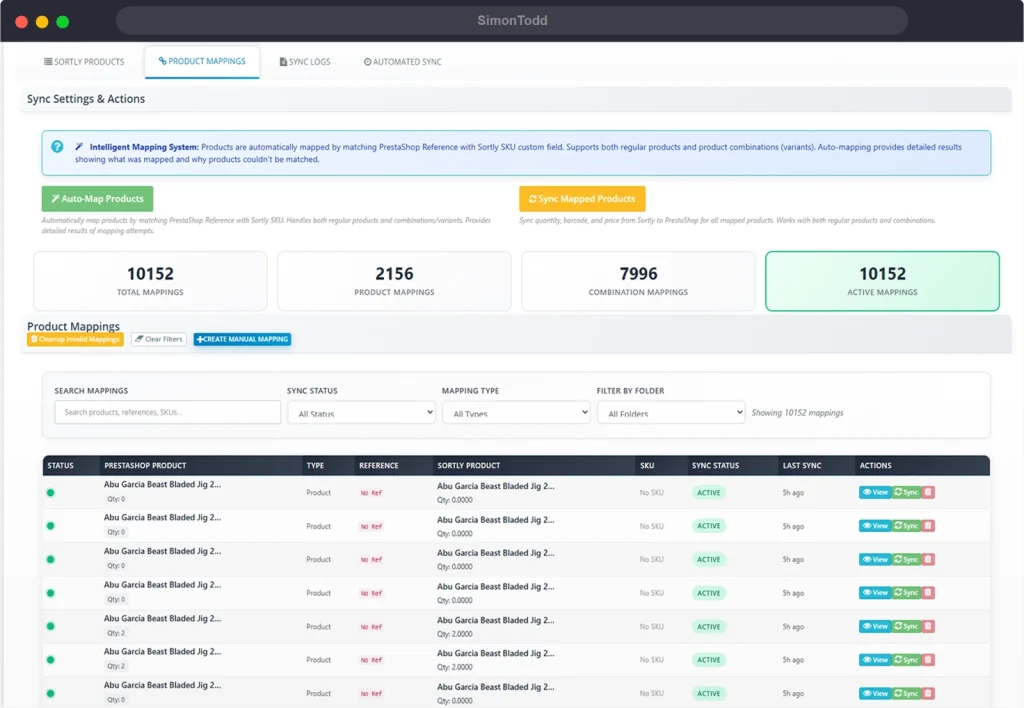
- Product mappings (which Sortly items link to which PrestaShop products)
- Sync logs so you can see exactly what happened
- Cron status for both full and incremental syncs
There’s also auto-mapping. If a Sortly item has a barcode that matches a PrestaShop product reference or EAN, the module creates the mapping automatically. For edge cases, you can create mappings manually.
Rate Limiting
Sortly’s API has rate limits, and if you’ve got 100+ folders with thousands of products, you’ll hit them. The module handles this gracefully — it monitors the rate limit headers, backs off when needed, and processes folders in batches. No more failed imports because you ran out of API calls.
Cron Setup
Once it’s configured, you set up two cron jobs:
# Daily full import (runs at 3am)
0 3 * * * /usr/bin/php /path/to/modules/sortlysync/cron/sortly_cron.php

# Hourly incremental sync
0 * * * * /usr/bin/php /path/to/modules/sortlysync/cron/sortly_incremental_cron.php
The full import handles new products and complete reconciliation. The incremental sync keeps everything current between full imports. Together, they mean stock levels are never more than an hour out of date.
Configuration Options
You can choose what to sync:
- Quantity — the main one, updates stock levels
- Barcode — can sync barcodes back to PrestaShop if needed
- Price — optional, if you manage pricing in Sortly
Batch sizes are configurable too. If you’re hitting memory limits or timeouts, you can reduce the batch size. If your server handles it fine, crank it up for faster imports.
The Dashboard
Everything’s managed through a dedicated admin page under Advanced Parameters. You can:
- Run manual imports (full or incremental)
- View and filter all imported Sortly products
- Manage product mappings
- Review sync logs
- Check cron job history
- Monitor API rate limit status
It also shows you unmapped products, so you can see at a glance which Sortly items haven’t been linked to PrestaShop yet.
Technical Bits
The module creates its own database tables for storing Sortly product data, mappings, and logs. This means sync operations are fast — it’s comparing against local data rather than hitting the PrestaShop product tables for every check.
It’s built for PrestaShop 8.x and properly handles the stricter type requirements that came with PHP 8. All the usual PrestaShop patterns — hooks, admin controllers, configuration forms.
Logging is configurable by section. You can have verbose logging during setup, then dial it back to errors-only once everything’s working.
Results
The overnight full import processes around 10,000 products in about 15 minutes. The hourly incremental sync typically takes under a minute and only updates items that have actually changed in Sortly.
Stock levels stay accurate without any manual work. The warehouse team continues using Sortly as normal, and the website reflects the current inventory automatically.