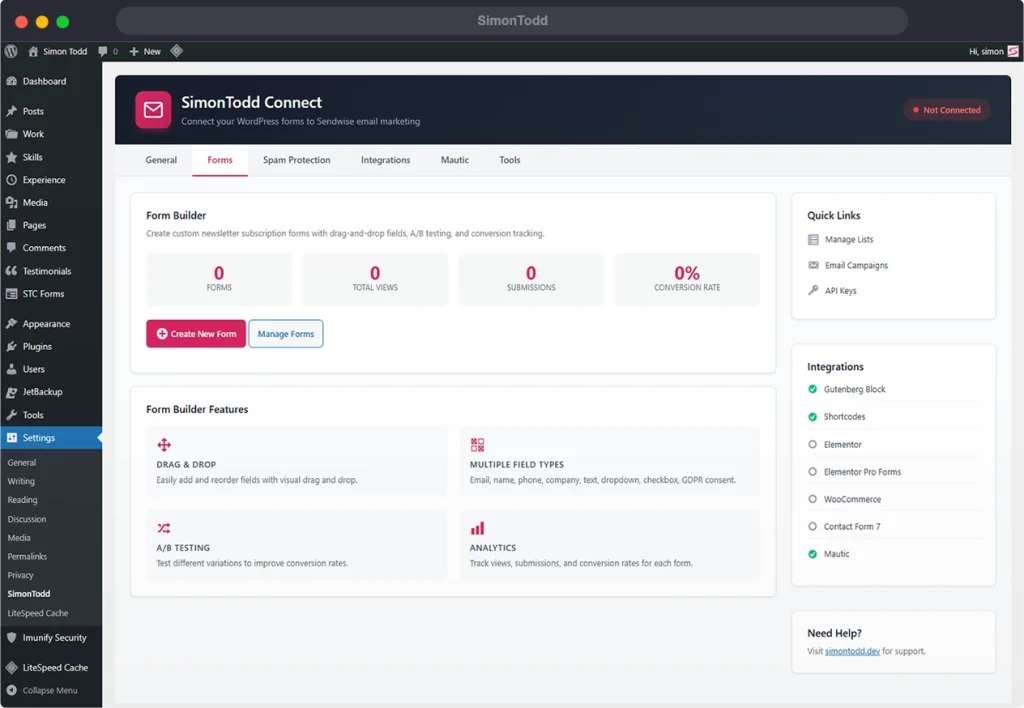
I’ve just released a major update to SimonTodd Connect, the WordPress plugin I use across all my client sites to handle newsletter signups and marketing automation. Version 2.0 brings some features I’ve been wanting to build for a while. Most notably a proper drag-and-drop form builder and built-in A/B testing.

What’s New
Drag-and-Drop Form Builder
Previously, the plugin offered a handful of pre-built form styles — default, inline, minimal, and card layouts. They work well for most situations, but I kept running into cases where clients needed something more customised: an extra phone field here, a company name there, or a specific GDPR consent checkbox with their own wording.
The new form builder solves this. You can now create completely custom forms by dragging fields onto a canvas:
- Email (required)
- First Name / Last Name
- Phone
- Company
- Custom text fields and textareas
- Dropdown selects
- Checkboxes
- GDPR consent
- Hidden fields (useful for tracking sources)
Each field can be set to full width, half width, or one-third width, so you can create compact multi-column layouts. Once you’ve built your form, you get a simple shortcode to drop it anywhere on the site.
A/B Testing
This is the feature I’m most pleased with. Every form you create can now have multiple variations, and the plugin will automatically split traffic between them.
You can test different button text, colours, form styles, or even entirely different field configurations. The plugin tracks views and conversions for each variation, calculates statistical significance, and lets you pick a winner once you’ve got enough data.
No more guessing whether “Subscribe” or “Get Updates” converts better — now you can actually find out.
Better Analytics
The dashboard widget has had a complete overhaul. It now shows:
- Subscriber growth with comparison to the previous period
- Form performance — views, submissions, and conversion rates for each form
- Top performing forms at a glance
- WooCommerce opt-in rates if you’re running an online shop
- Mautic integration stats — contacts created, events tracked
You can set the analytics period to 7, 30, or 90 days depending on how much data you want to review.
Mautic Segment Integration
If you’re using Mautic for marketing automation (and if you’re not, you probably should be), you can now assign contacts to specific segments directly from the plugin.
Each form can have its own segment assignment, so newsletter subscribers go into one segment whilst lead magnet downloads go into another. The WooCommerce integration also supports automatic customer segmentation — first-time buyers, repeat customers, and VIP customers based on lifetime value.
WooCommerce Purchase Tracking
Speaking of WooCommerce, the integration now tracks much more than just the checkout opt-in. Purchases are logged to Mautic with full product and category data, customer lifetime value is calculated automatically, and customers are tagged based on their buying behaviour.
This means you can build Mautic campaigns that target customers who’ve bought from specific categories, or who’ve crossed certain spending thresholds.
Upgrading
If you’re already running SimonTodd Connect, just update through the WordPress dashboard as usual. The plugin will create the new database tables automatically and your existing settings will be preserved.
The new Form Builder appears as “STC Forms” in your WordPress admin menu. Your existing shortcodes and forms will continue to work exactly as before.
Get In Touch
If you’d like SimonTodd Connect set up on your WordPress site, or you need help with your email marketing and automation setup, get in touch. I offer ongoing support packages that include plugin updates, Mautic configuration, and campaign management.