When we build and manage websites for our clients, we want to make their experience as smooth as possible. That’s why we’ve developed a custom WordPress plugin that’s installed on every site we manage, giving you direct access to support, keeping your site secure, and ensuring you’re always in the loop.
Here’s what the SimonTodd Agency plugin does for you.
One-Click Support Access
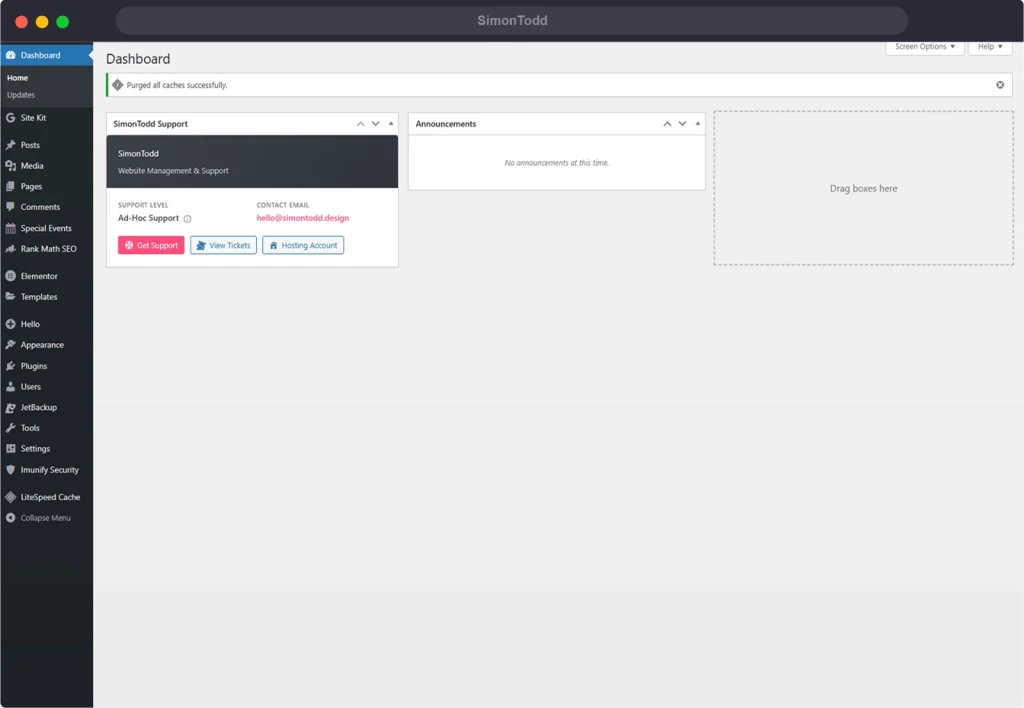
Need help with your website? The plugin adds a support widget directly to your WordPress dashboard. From there, you can create a support ticket, view your existing tickets, or access your hosting account—all without having to remember login details for our helpdesk.
When you click “Get Support” or “View Tickets”, the plugin automatically logs you into our support portal. No passwords to remember, no separate accounts to manage. Just click and you’re in.
This auto-login feature uses secure JWT authentication, generating a fresh token each time you access support. It’s both convenient and secure.
Your Dashboard, Your Information
The moment you log into your WordPress admin, you’ll see a branded widget showing:
- Your support level – Whether you’re on our managed hosting with priority support or ad-hoc support
- Support hours – When we’re available and whether we’re currently online
- Direct contact – Our email address for quick questions
- Quick action buttons – Get Support, View Tickets, and Hosting Account links
Everything you need is right there on your dashboard, no hunting around required.
Stay Informed with Announcements
We use the plugin to send important updates directly to your WordPress dashboard. Whether it’s scheduled maintenance, new features, or security advisories, you’ll see them as soon as you log in.
Announcements appear in a dedicated widget, with unread notifications clearly highlighted. Click on any announcement to read the full details, and mark them as read when you’re done.
Professional Branding Throughout
Your WordPress login page displays our branding, so you know exactly whose systems you’re working with. The admin footer shows your support level and links to get help. It’s a small touch, but it reinforces that your site is professionally managed.
Security Without the Hassle
Behind the scenes, the plugin applies a suite of security hardening measures automatically:
- Version hiding – WordPress version numbers are removed from your site’s code, making it harder for attackers to target known vulnerabilities
- XML-RPC disabled – This older WordPress feature is frequently exploited; we disable it by default
- Author enumeration blocked – Prevents attackers from discovering usernames through URL tricks
- REST API user endpoints secured – User information isn’t exposed to unauthenticated visitors
- File editing disabled – The built-in theme and plugin editor is turned off, preventing code changes from within WordPress
You don’t need to install additional security plugins or configure anything yourself. It’s all handled.
Agency Admin Access
We maintain an admin account on your site for maintenance and support work. The plugin keeps this account hidden from your user list, so it doesn’t clutter your view or cause confusion. You’ll only see the users that matter to your day-to-day operations.
Maintenance Mode When Needed
When we’re making significant updates to your site, we can activate maintenance mode remotely. Visitors see a branded “under maintenance” page while you and your team can continue working normally—just log in as usual.
The maintenance page displays our contact details and your site name, keeping everything professional even during downtime.
Central Management
Here’s the clever bit: all of this is managed from a central hub. When we update support hours, change branding, or send an announcement, it automatically syncs to all client sites. We don’t need to log into each site individually to make changes.
For you, this means consistency across everything. The support link in your dashboard always points to the right place. Announcements reach you as soon as we publish them. Settings stay in sync without any effort on your part.
What This Means for You
The SimonTodd Agency plugin isn’t something you need to configure or manage—it works quietly in the background, making your life easier:
- Get support faster – One click takes you straight to our helpdesk, already logged in
- Stay informed – Announcements appear automatically in your dashboard
- Stay secure – Essential security measures are applied without any setup
- Know who to contact – Our details are always visible in your admin area
- Professional experience – Branded login pages and consistent styling throughout
Built for the Way We Work
We developed this plugin because off-the-shelf solutions didn’t quite fit. We needed something lightweight, secure, and focused on what actually matters: making it easy for our clients to get help when they need it, and keeping their sites safe without adding complexity.
Every site we build and manage gets this plugin installed. It’s part of our commitment to providing a complete, professional service—not just building websites, but looking after them properly.