
Managing inventory across multiple systems is one of those tasks that sounds straightforward until you’re knee-deep in spreadsheets and API documentation. Recently, I needed a quick way to audit SKU assignments in Sortly — specifically, to identify which products in a particular folder structure were missing their SKU custom field.
Rather than manually clicking through hundreds of items, I built a lightweight PHP tool to handle the job.
The Problem
Sortly is brilliant for visual inventory management, but when you’re syncing data with other systems (like PrestaShop), you need consistent identifiers. In my case, every product needs an SKU in a custom field. The challenge? With products spread across multiple nested folders, there’s no easy way to see at a glance which ones are missing this crucial data.
The Solution
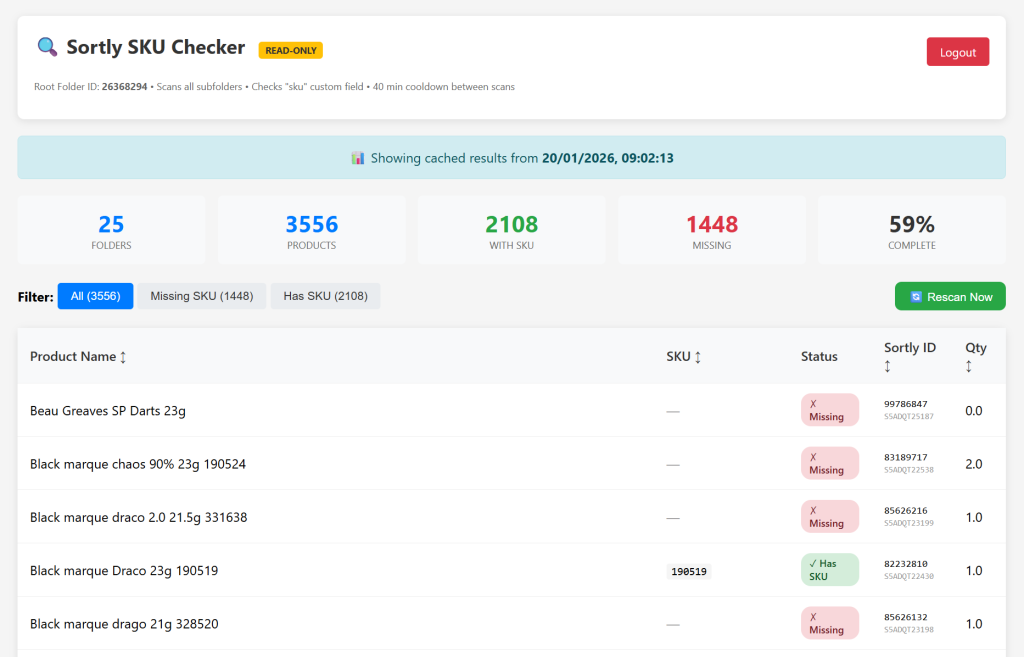
I created a standalone PHP script that:
- Connects to the Sortly API (read-only, of course — I’m not risking any accidental writes)
- Recursively scans a root folder and all its subfolders
- Extracts the SKU custom field from each product
- Displays everything in a filterable, sortable table
- Caches results to avoid hammering the API
Key Features
Rate Limit Awareness
Sortly’s API has rate limits, and respecting them is just good citizenship. The tool monitors the sortly-rate-limit-remaining header and automatically backs off when things get tight. There’s also a 40-minute cooldown between full scans — aggressive enough to keep data fresh, conservative enough to stay within limits.
Real-Time Progress
Nobody wants to stare at a blank screen wondering if something’s actually happening. The scan shows live progress: which folder is being processed, how many products found, current rate limit status. It’s surprisingly satisfying watching those numbers tick up.
Persistent Caching
Results are saved to a JSON file, so you’re not waiting for a fresh API pull every time you load the page. Open it up, see your data instantly, and only rescan when you actually need updated figures.
Simple Authentication
It’s password-protected with a basic session login. Nothing fancy, but enough to keep casual browsers out.
Technical Bits
The script is entirely self-contained — one PHP file, no framework dependencies. It reads the Sortly API key directly from the PrestaShop configuration (if installed alongside the SortlySync module) or from a simple config file.
The UI is vanilla HTML/CSS/JavaScript. No build step, no npm install, no webpack config to wrestle with. Just upload and go.
What I Learned
Building tools like this reinforces something I keep rediscovering: the best solution is often the simplest one that actually gets used. A fancy React dashboard with GraphQL and real-time WebSocket updates would be impressive, but a single PHP file that just works? That’s what actually solves the problem.
The Sortly API is well-documented and predictable, which made this a pleasant afternoon project rather than a multi-day debugging session. If you’re working with their API, the pagination is straightforward (99 items per page maximum), and the rate limit headers tell you exactly where you stand.
Conclusion
Sometimes you just need a quick audit tool. This one does exactly what it says on the tin: shows which products have SKUs and which don’t. Nothing more, nothing less.
If you’re managing inventory in Sortly and need similar visibility, the approach is simple enough to adapt. The key is respecting the API limits, caching sensibly, and keeping the interface minimal enough that it doesn’t become its own maintenance burden.