
A deep dive into creating a tailored events management system for Nelson Signature Travel
When Gary from Nelson Signature Travel approached me about adding special events functionality to his luxury minicoach tour website, I knew a generic plugin wouldn’t cut it. His business runs premium private tours across Northern Ireland — think golf trips, wedding transport, and bespoke excursions to the Giant’s Causeway. The website needed an events system that matched that level of quality and attention to detail.
Off-the-shelf solutions like The Events Calendar are brilliant for what they do, but they come with baggage: features you don’t need, styling that fights your theme, and that unmistakable “plugin” feel that breaks the seamless experience. Gary needed something built specifically for his business.
So I built it from scratch.
The Brief
Nelson Signature Travel wanted to promote special group events — things like race days, highland shows, and seasonal tours. Each event needed its own dedicated page with all the details a potential customer would want: dates, pricing, itinerary, what’s included, and a clear path to booking.
The key requirements were:
- SEO-optimised event pages that would rank well for search terms like “Royal Highland Show transport from Belfast”
- Seamless integration with the existing Elementor-built website
- Schema.org markup for rich search results
- A booking enquiry system that captured leads without the complexity of full e-commerce
- Easy management so Gary could add and update events without touching code
The Technical Approach
I built the NST Special Events plugin as a custom post type with its own meta boxes, templates, and admin interface. Here’s what went into it:
Custom Post Type with Extended Meta
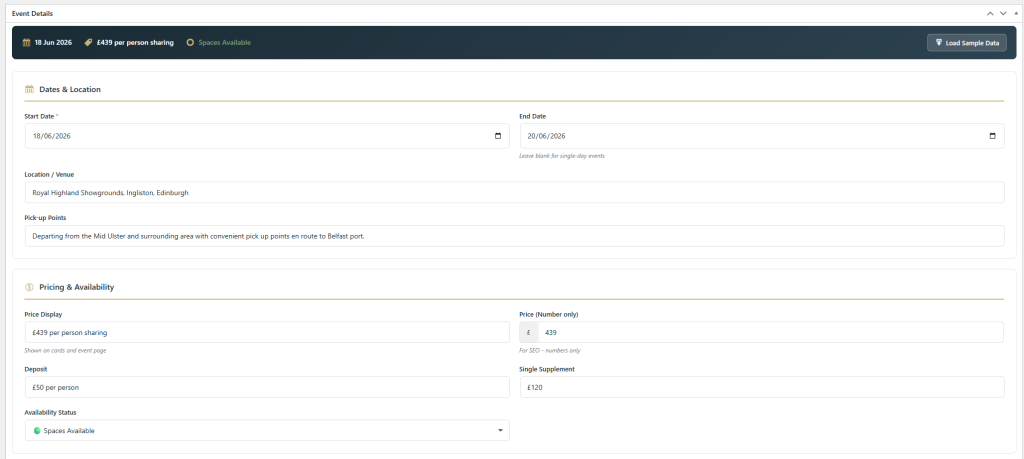
Each event stores far more than just a title and description. The plugin captures:
- Event dates (start and end)
- Pricing tiers (adult, child, deposit)
- Pickup locations with times
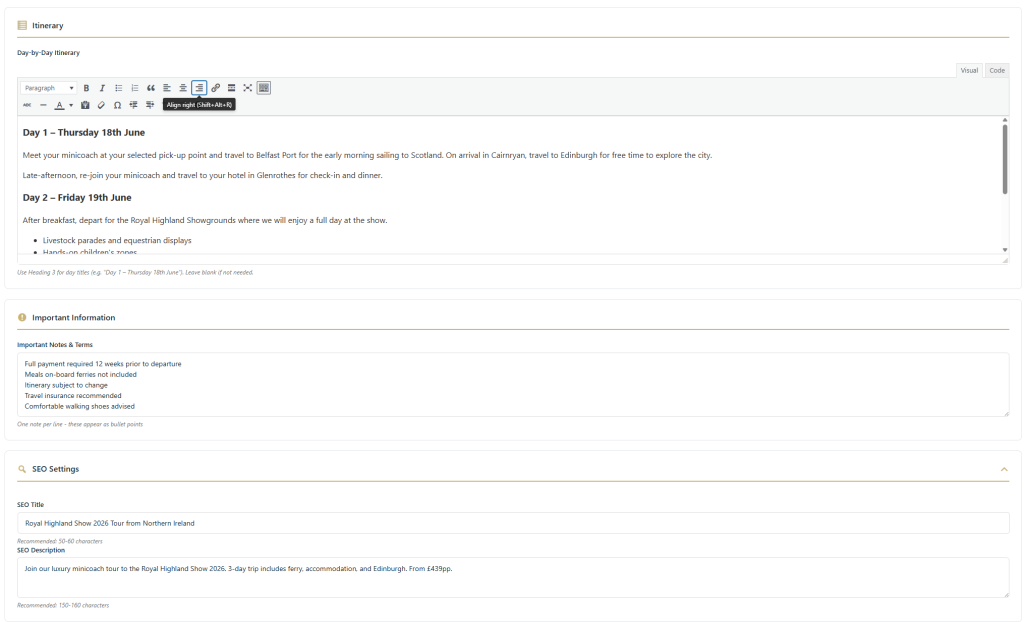
- Full itinerary breakdown
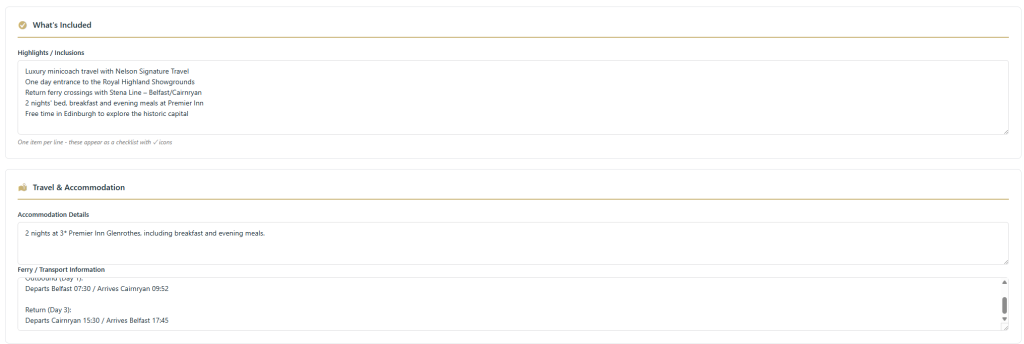
- What’s included (meals, entry fees, etc.)
- Ferry/transport information
- Important notices
- Availability status (available, limited, sold out)
- Featured images with automatic Open Graph tags
Automatic Page Templating
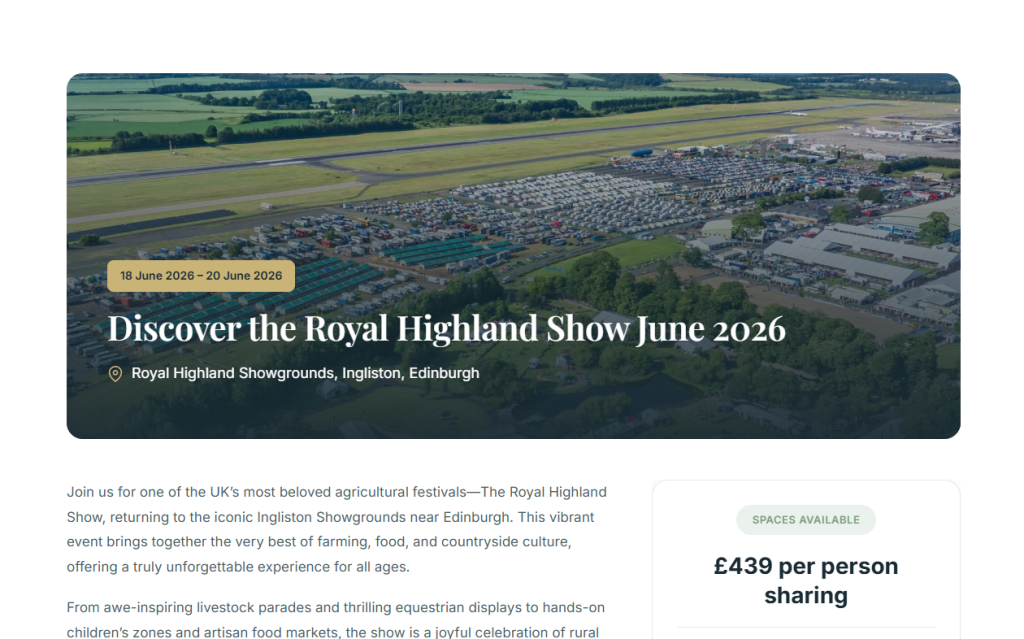
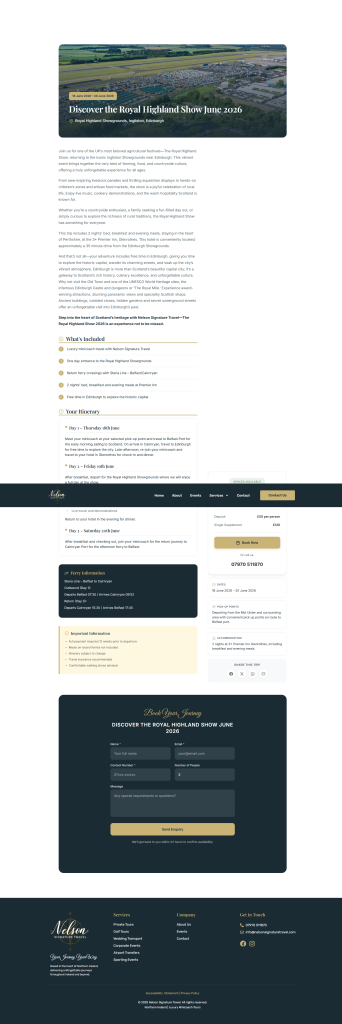
One of the trickier aspects was making the event pages look consistent with the rest of the site whilst working within WordPress’s template hierarchy. The plugin completely takes over the single-nst_event template, rendering a bespoke layout with:
- Hero section with the event’s featured image and gradient overlay
- Two-column layout with content on the left and a sticky booking sidebar on the right
- Expandable itinerary sections with pickup times
- “What’s Included” visual grid
- Full-width booking form section at the bottom
- Mobile-optimised floating “Book Now” button that scrolls to the form
The CSS had to be bulletproof. WordPress themes have opinions about typography, spacing, and box models that needed overriding without breaking anything else. I ended up using CSS custom properties for the brand colours and aggressive specificity to ensure the plugin styles always won.
The Booking Form
Rather than bolting on WPForms or Gravity Forms, I built a custom AJAX-powered booking form directly into the plugin. The form sits in a dedicated section at the bottom of each event page — clicking any “Book Now” button smoothly scrolls to it.
The form captures:
- Name, email, phone
- Number of adults and children
- Pickup location (dropdown populated from the event’s pickup points)
- Message/special requirements
- Hidden event name field for context
Submissions are validated client-side and server-side, then emailed directly to Gary’s inbox. They’re also logged to a custom database table with status tracking (new, contacted, confirmed, cancelled) so nothing gets lost if an email fails to deliver.
Submissions Management
The admin area includes a full submissions management page where Gary can:
- View all booking enquiries with filtering by status
- Update submission status as he works through them
- See which event each enquiry relates to
- Export submissions to CSV for record-keeping
- Bulk delete or update multiple submissions
There’s even a notification badge on the admin menu showing how many new submissions are waiting.
Spam Protection
The form includes spam protection options configurable from the settings page:
- Honeypot field (invisible to users, catches bots)
- Optional Cloudflare Turnstile integration
- Optional Google reCAPTCHA v2 integration
Availability States
Events can be marked as “Available”, “Limited Availability”, or “Sold Out”. The plugin automatically adjusts the UI based on this:
- Available: Standard gold “Book Now” buttons
- Limited: Amber-coloured buttons with “Limited Availability” badges
- Sold Out: Greyed-out buttons that can’t be clicked, “Sold Out” badges throughout
This saves Gary from having to manually update button text or hide forms when an event fills up.
Homepage Integration
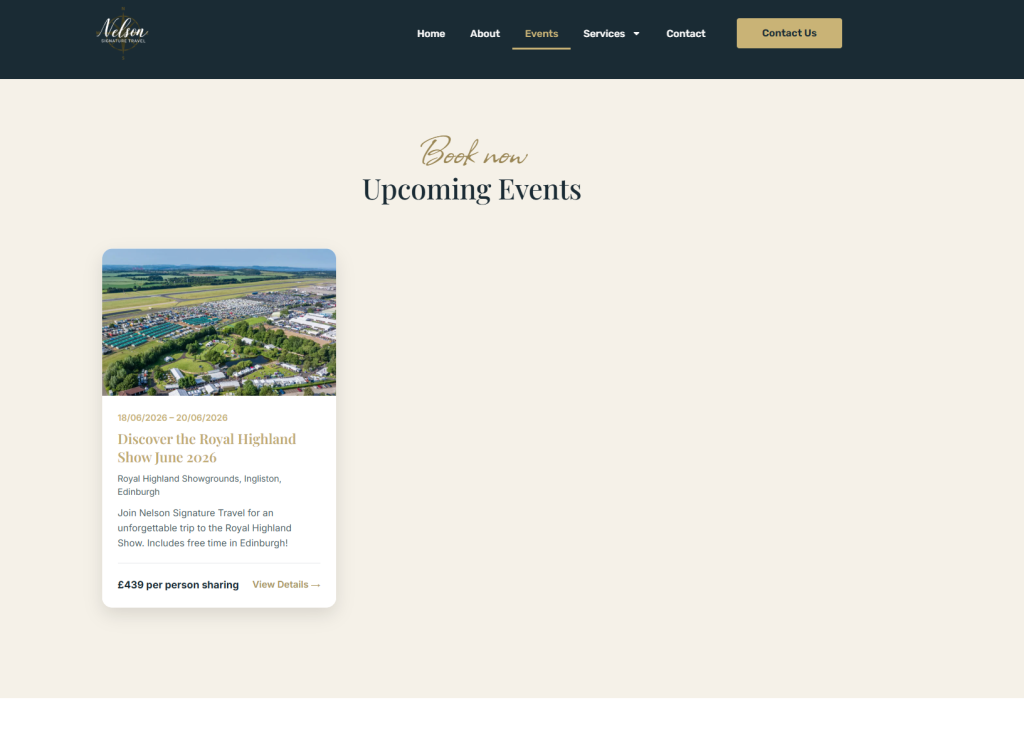
Gary wanted event cards to appear on his homepage, pulling dynamically from the plugin. I created both a shortcode ([nst_event_cards]) and an Elementor widget so he could drop event listings anywhere on the site.
The cards show the event image, title, date, price, and availability status — with automatic “Sold Out” or “Limited” badges based on the event’s availability setting.
Settings Page
The plugin includes a comprehensive settings page where Gary can:
- Toggle display options (show/hide card enquire buttons, sidebar book button, floating CTA, social sharing)
- Configure which email address receives submissions
- Customise form fields and success messages
- Set company contact information (phone and email shown in the booking section)
- Choose spam protection method and enter API keys
The Challenges
Sticky Sidebar Positioning
Getting the booking sidebar to stick whilst scrolling on the event pages was more trouble than expected. The CSS position: sticky property is notoriously temperamental — if any parent element has overflow: hidden or overflow: auto, sticky positioning breaks silently.
After some debugging on the live site, I traced the issue to Elementor’s page wrappers and various theme containers. The fix involved adding explicit overflow: visible overrides to potential parent containers:
body.single-nst_event .site-main,
body.single-nst_event .page-content,
body.single-nst_event main#content,
body.single-nst_event #content {
    overflow: visible !important;
}
Not elegant, but necessary when you’re working within someone else’s theme framework.
Mobile Responsiveness
The desktop layout uses CSS Grid for the two-column arrangement. On mobile, this collapses to a single column with the sidebar content appearing after the main event details. But with a long page, users might scroll past the booking information entirely.
The solution was a floating “Book Now” button that appears on mobile and tablet, fixed to the bottom of the viewport. It shows the event title and price, with a prominent booking button. The floating CTA fades out when you’re near the top of the page (where the main CTA is visible in the sidebar) and reappears as you scroll down. Small touch, but it keeps the booking action always within reach.
For sold-out events, the floating button displays “Sold Out” in a disabled state rather than hiding entirely — maintaining consistency with the rest of the page.
LiteSpeed Cache
Gary’s hosting uses LiteSpeed Enterprise with aggressive caching. During development, I kept updating the CSS only to see old styles persist. The plugin now includes cache-busting version strings on all enqueued assets, and I’ve documented the cache purge process for future updates.
Theme CSS Conflicts
WordPress themes apply their own typography and spacing rules that were interfering with the event page layout. The plugin CSS needed to be aggressive with !important declarations and high-specificity selectors to ensure consistent rendering. Every element within .nst-event-page gets explicit font-family, margins, and box-sizing rules to create a predictable baseline.
The Admin Experience
The WordPress admin interface went through several iterations. The final version uses a single-page editor with collapsible meta box sections:
- Event Details: Dates, pricing, availability status
- Description: Full WYSIWYG editor with formatting support
- Pickup Locations: Repeatable fields for location name and time
- Itinerary: Repeatable fields for time and activity
- What’s Included: Checkbox grid for common inclusions plus custom items
- Additional Information: Ferry details, important notices
There’s a “Load Sample Data” button that populates the form with example content (a Royal Highland Show trip) — helpful for testing or showing Gary how the fields work. It even asks whether to fill empty fields only or overwrite everything.
The Result
The plugin now powers the events section of nelsonsignaturetravel.com, with dedicated pages for upcoming tours that look and feel like a natural extension of the main site.
Each event page is SEO-optimised with proper Schema.org Event markup, Open Graph meta tags for social sharing, and semantic HTML structure. The booking form has already captured enquiries, and Gary can manage everything from the WordPress admin without needing to understand a line of code.
What I Learned
Building a bespoke plugin rather than customising an existing one takes longer, but the end result is exactly what the client needs — nothing more, nothing less. There’s no bloat, no unused features, no fighting against someone else’s design decisions.
The biggest lesson was around CSS specificity when working with page builders like Elementor. Their generated classes are unpredictable, and you need to be aggressive with your selectors whilst being careful not to break the rest of the site. CSS custom properties helped enormously here — defining all colours and spacing as variables meant I could adjust the entire plugin’s appearance from one place.
The other takeaway was the value of building in flexibility from the start. The settings page with toggleable features means Gary can adjust the plugin’s behaviour without asking me to modify code. Want to hide the social sharing buttons? Tick a box. Don’t need the floating mobile CTA? Turn it off. That kind of control keeps clients happy long after the initial build.
If you’re running a WordPress site and need functionality that doesn’t quite exist in plugin form, get in touch. Sometimes the right solution is building exactly what you need.